




Hi, I’m @mattsuu, a frontend engineer at Merpay. This is Day 2 of Merpay & Mercoin Tech Openness Month 2026.
Our team is responsible for developing Engagement Platform (EGP), a suite of internal tools for marketers and Project Managers (PMs). One of its features is creating and publishing landing pages (LPs), and we previously introduced EGP Pages, a WYSIWYG component editor built by the same team.
This time, I’d like to introduce the successor to EGP Pages, EGP Code, which we built from scratch. It’s an HTML-based internal editor for building LPs while chatting with an AI agent. What sets it apart is that it goes beyond generating the visuals. It also builds the parts needed for production into the same editing experience. It has already been used to build more than 10 production LPs.
There are already many tools that can generate UI with AI, such as v0, Gemini Canvas, Claude Design, and Figma Make. But even if you can produce the visuals, running an LP in production surfaces challenges specific to our internal environment, such as API integration, quality assurance, and integration with our native apps. We built EGP Code in-house to close that gap.
EGP Pages and the challenges of AI editing
Before diving into EGP Code, we need to briefly talk about EGP Pages and its limitations. EGP Pages is a no-code WYSIWYG component editor where you pick and combine blocks. You assemble pages from 40+ components such as Layout and Text via drag and drop. It works well for its intended purpose, which is to let marketers build LPs without engineering help, and many LPs are still built with EGP Pages to this day.
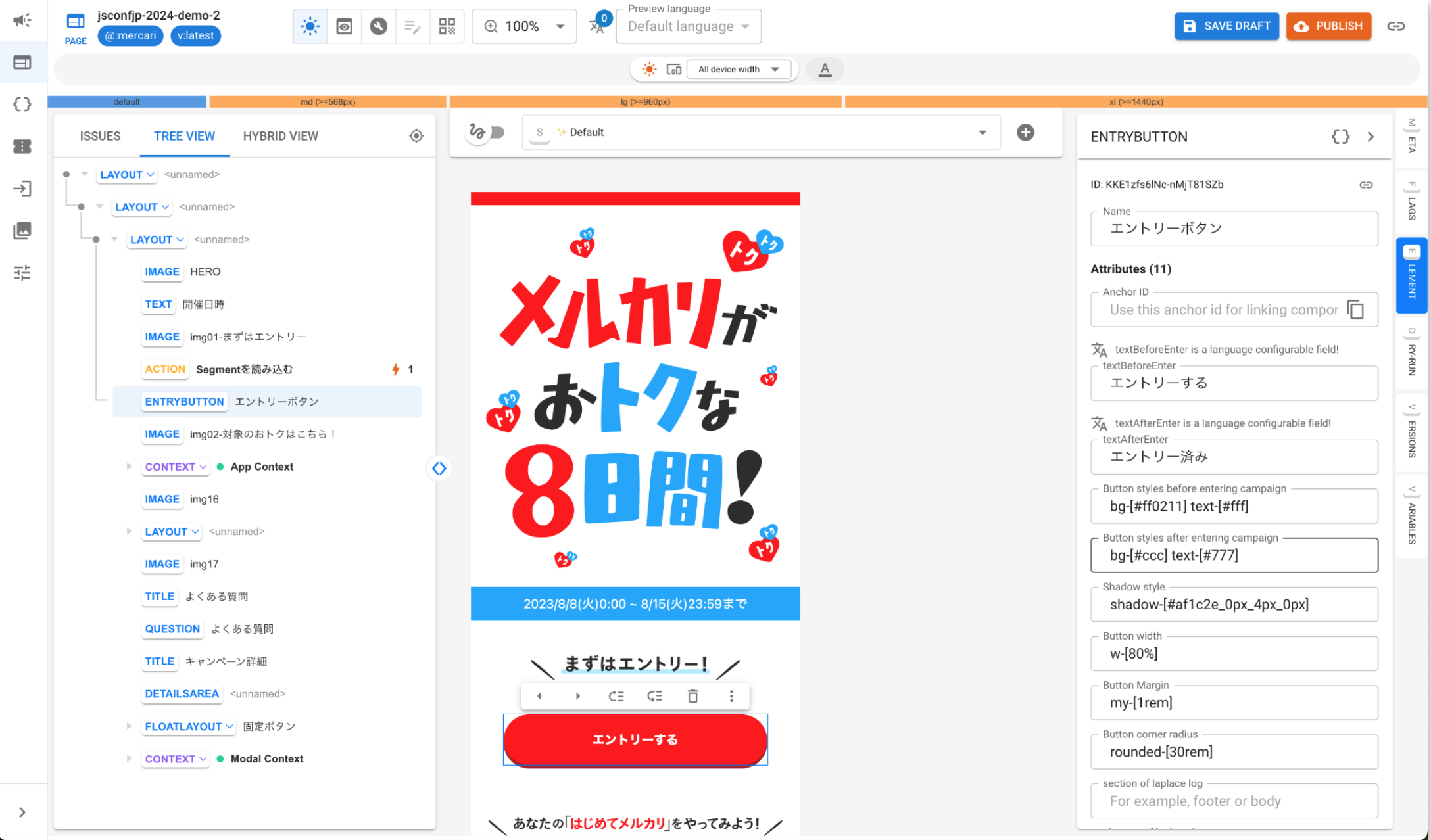
The turning point came when a new requirement emerged: editing pages with AI. EGP Pages was designed around the premise that humans assemble pages via drag and drop, so its data structure becomes a liability when an AI is the one editing it. For example, the JSON tree for a page where a button increments a number looks like this:
{
  "components": [{
    "id": "root",
    "elements": [
      { "id": "1", "tagName": "Context",
        "props": { "value": [
          { "name": "count", "type": "code", "value": "0" },
          { "name": "increment", "type": "code", "value": "(count) => count + 1" }
        ]}},
      { "id": "2", "tagName": "Layout",
        "props": { "children": [":=element.3", ":=element.4"] }},
      { "id": "3", "tagName": "Text",
        "props": { "value": "Count: ${context.count}" }},
      { "id": "4", "tagName": "Action",
        "props": { "label": "+1",
          "onTriggerAction": [{ "type": "SET_CONTEXT",
            "payload": { "count": "${context.increment(context.count)}" }}]}}
    ]
  }]
}
This structure works fine when humans edit it through the UI, but letting an LLM edit it directly surfaces several problems.
- Proprietary tree structure: Notation like
":=element.3"has to be explained to the AI in every prompt, which bloats the context. - Logic scattered across nodes: state, conditions, behavior, and display are spread across
Context/When/Action/Text, so understanding a single interaction requires traversing the whole tree. - JavaScript embedded inside JSON strings: Whether something is a template literal or an
eval‘d expression depends on the rendering component, which makes it hard to interpret correctly.
On top of that, this JSON tree consumes roughly twice the tokens of equivalent HTML, so API cost and context window usage grow with every edit. There was also no test infrastructure, leaving no way to mechanically verify the AI’s edits before publishing.
This doesn’t mean EGP Pages was poorly designed. It was the right design, optimized for the no-code era. Once editing by AI became a requirement, though, we had to rethink the foundation.
Rebuilding on HTML
We had two options: improve the existing JSON representation for AI, or rebuild from scratch with AI in mind from the start. We chose the latter and based the page representation on HTML. Both humans and LLMs are familiar with HTML , so there’s no need to teach a proprietary JSON schema or reference syntax in every prompt.
The counter page from earlier looks like this in EGP Code:
<body>
  <egp-script timing="page-loaded">
    rx.count = 0;
  </egp-script>
  <egp-script>
    rx.increment = () => { rx.count = (rx.count ?? 0) + 1; };
  </egp-script>

  <p><egp-text>Count: {{rx.count}}</egp-text></p>
  <egp-button :onclick="rx.increment">+1</egp-button>
</body>
It achieves the same goal as EGP Pages using roughly half the code and half the tokens.
That said, plain HTML alone can’t handle dynamic behavior such as state management or conditional rendering. And allowing arbitrary JavaScript inside <script> tags makes a page’s behavior hard to follow.
So we confined the dynamic parts, such as state management, conditional rendering, and loops, to a small set of Web Components (<egp-*>). State, conditions, and behavior are no longer scattered the way they were in EGP Pages after this split between plain HTML (for static parts) and Web Components (for dynamic parts) .
We adopted Tailwind CSS for styling. By staying close to patterns web developers already know, neither humans nor AI have to learn a proprietary system.
A side benefit is that we keep dependencies on external libraries to a minimum, so individual LPs don’t pull in their own packages. This reduces the LP-level attack surface and helps mitigate supply-chain risks (e.g., compromised npm packages), because the runtime is a small, centrally managed set of components.
How to use
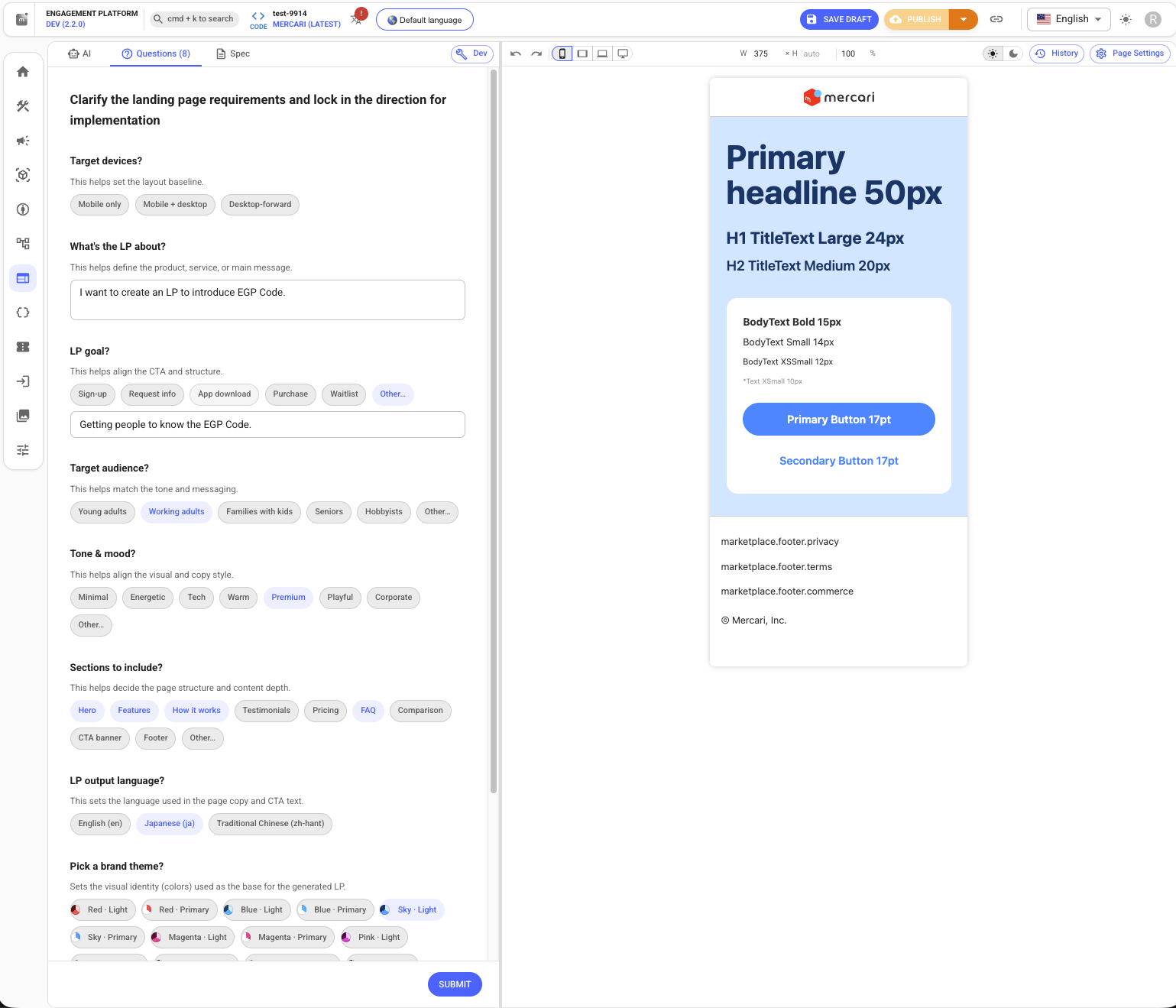
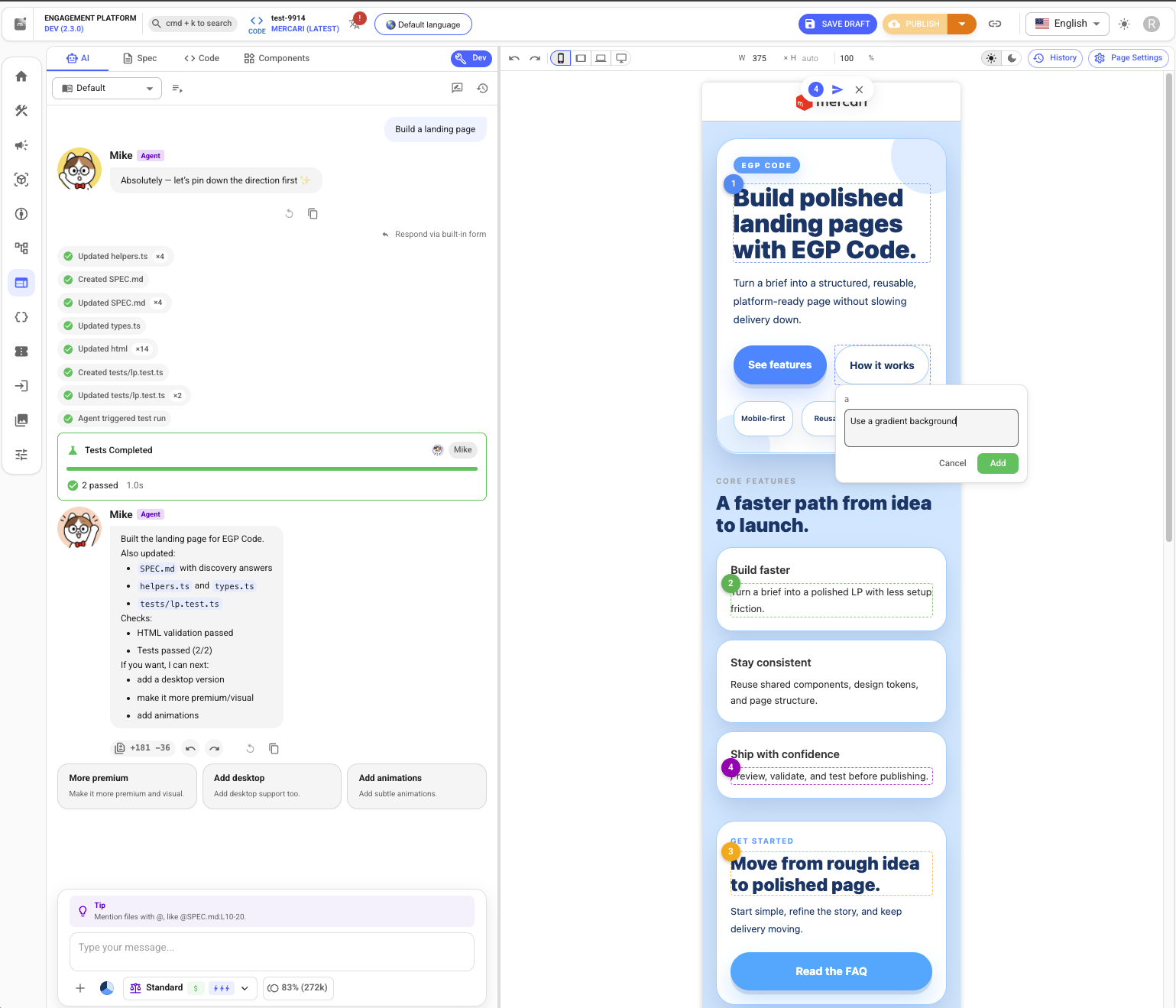
In EGP Code, most of the work happens by chatting with the AI agent. For an open-ended request like "I want to make an LP," the agent doesn’t start building right away. Instead, it asks context-aware follow-up questions. You answer questions about things like the target device, color theme, and which sections to include, by picking from the provided options.
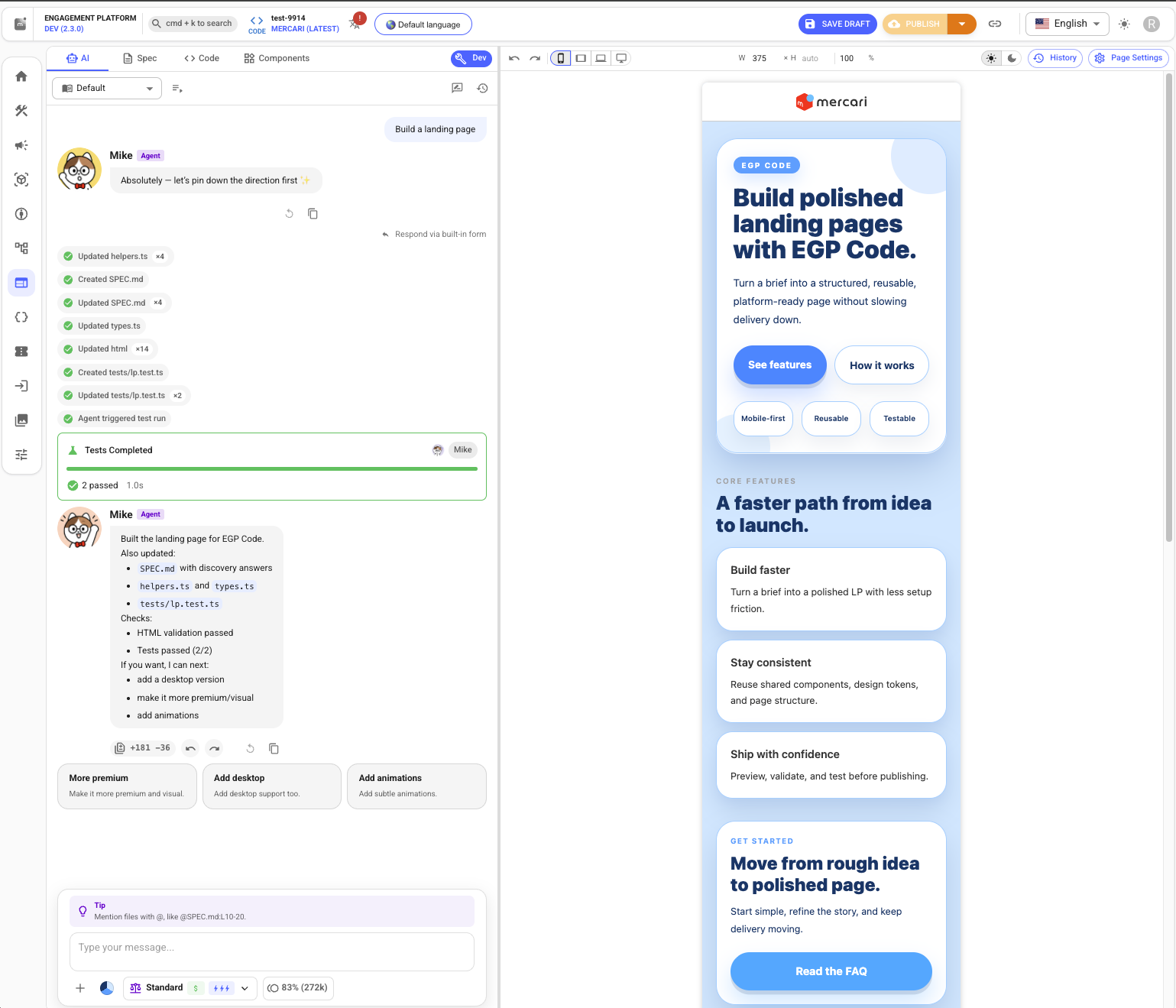
Once you submit your answers, the agent generates the HTML along with its tests, and a first-draft LP takes shape.
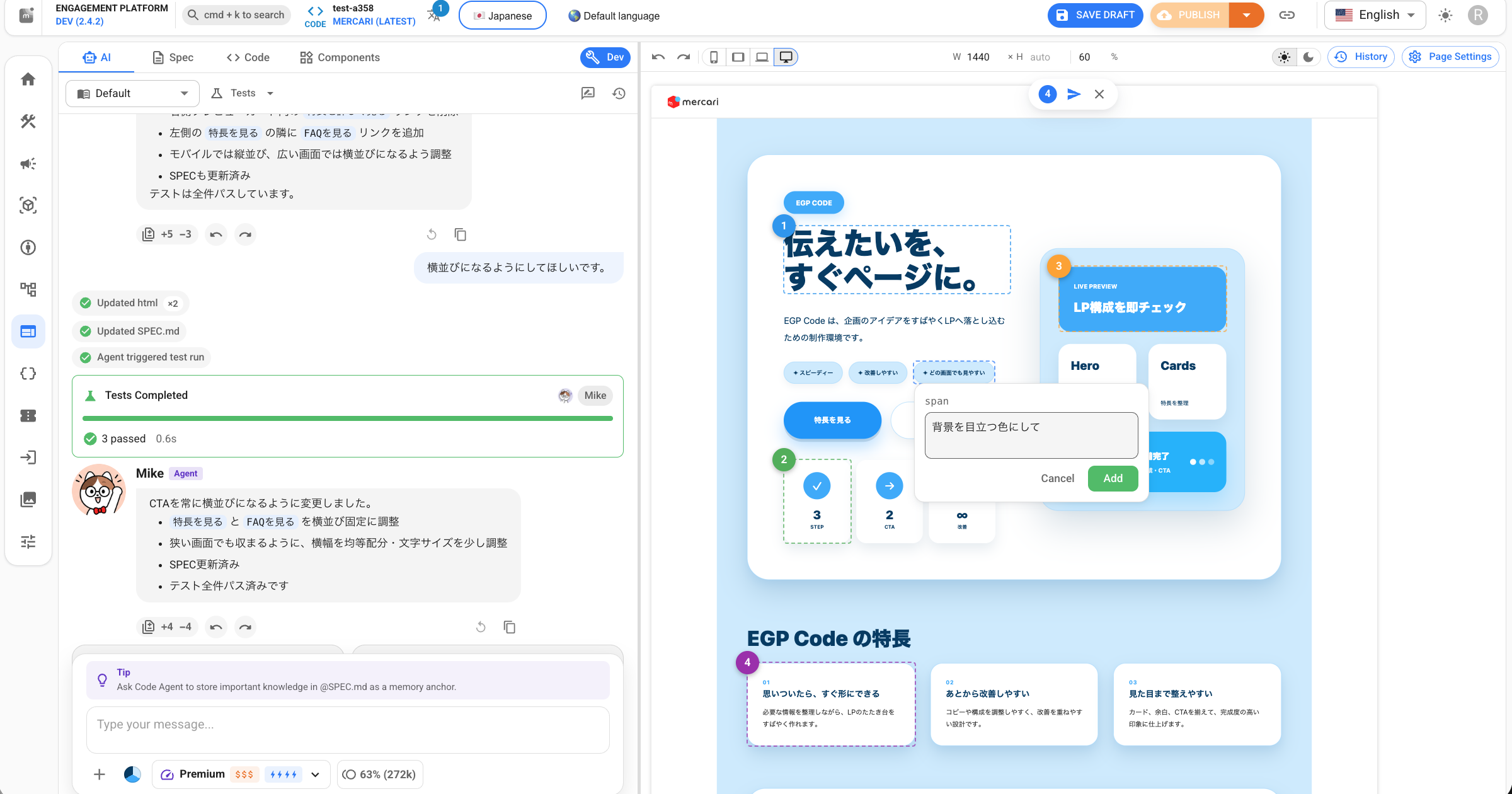
Once the rough layout is in place, you refine it by selecting elements such as buttons and text directly. When you click a target and ask "make the font size bigger" or "change the wording to ~," the agent knows exactly where to edit without you having to describe the location. You can also attach comments to multiple elements at once, or drag and drop a reference image.
Three building blocks for production
When you hear "LP," you might picture a static page of text and images. In reality many LPs involve dynamic behavior: the call-to-action button changes based on entry status, the content varies by user attribute, and analytics logs are sent on each tap behind the scenes.
So having a polished look isn’t enough for a production LP. You also need the surrounding pieces: integration with internal APIs, analytics logging on every tap, a way to verify display and behavior before publishing, and a way to bridge the navigation differences between app and web.
EGP Code builds these pieces into the editing experience. Below, I’ll walk through each one.
Internal API integration and logging
LPs frequently call internal APIs to do things like fetching a product list or checking entry status. However, internal APIs aren’t part of an AI tool’s training data. EGP Code closes this gap by teaching the AI how to use them on demand.
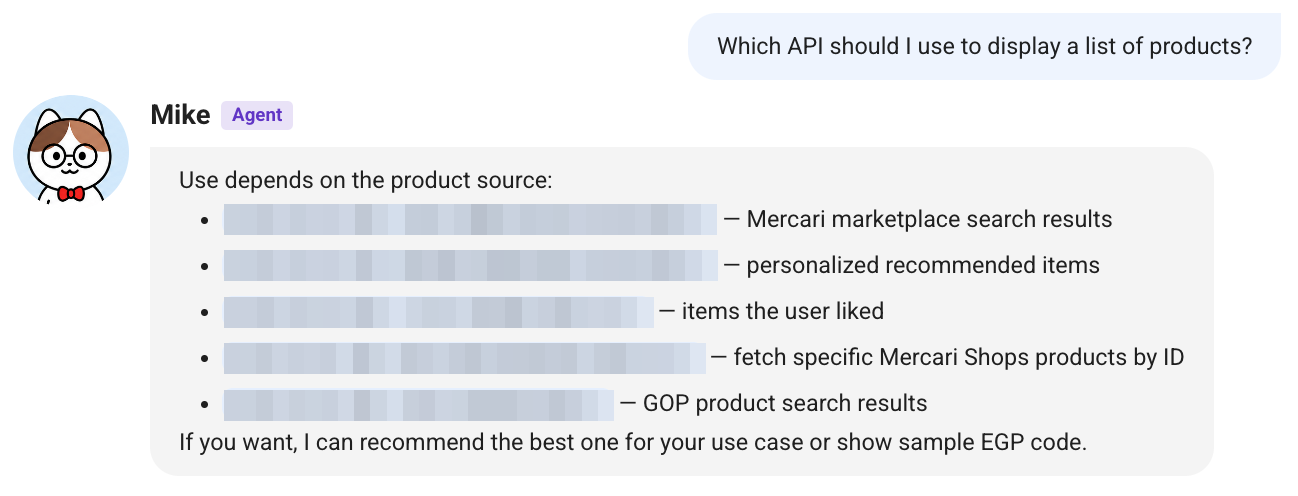
For example, if you ask "Which API should I use to display a list of products?", the agent surfaces the relevant internal APIs along with what each one does.
Behind this exchange, the agent follows a flow: find the relevant API, learn how to use it, then implement the call with proper types.
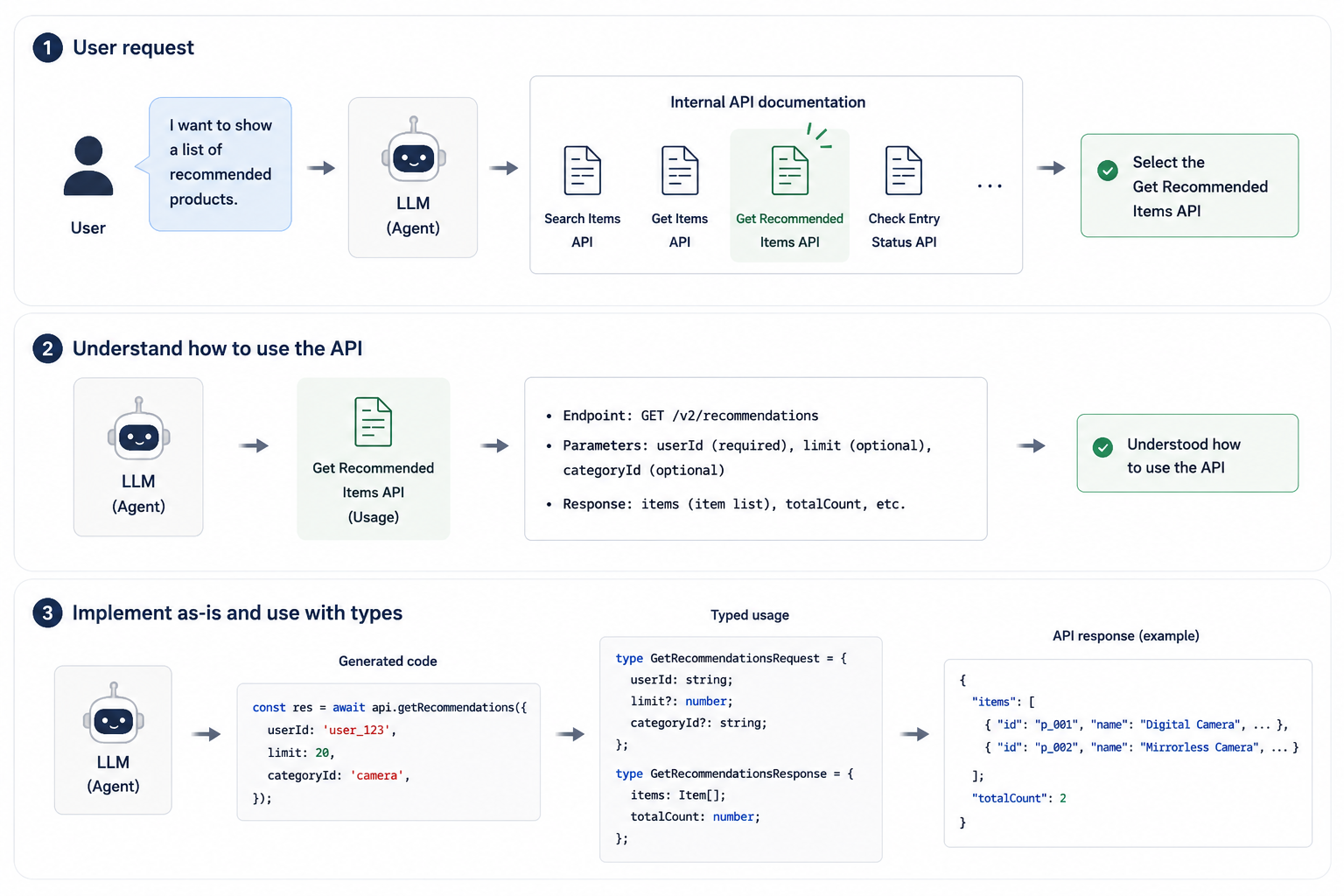
A few design choices make this flow possible.
First, we document how to use each internal API in a Markdown file, one per API. In practice, the file layout looks like this:
api-searchExampleItems.md
api-postExampleEntry.md
api-getExampleSegment.md
api-getExampleRecommendations.md
runtime-event-log.md
...
Putting every API description into the prompt would waste tokens. So we pass only the title and purpose of each document up front, and let the AI load the body only when it needs to.
Second, internal APIs are called through thin, typed wrapper functions. All the LP sees is a function call; the wrapper handles the differences in auth headers, service routing, and paths. If a call is used incorrectly, the linter catches it.
Analytics logging works through the same document-lookup approach. When logging is needed, the agent loads the corresponding document and generates the logging code through the same flow as an API call. As a result, just asking the AI to "show a product list" produces a dynamic LP that calls the internal API correctly.
Tests and quality assurance that stay inside the editor
Having a human visually verify every change isn’t realistic, whether it’s checking if API calls work or that a button responds as expected. So EGP Code has testing built into the editor.

However, non-engineers are typically unfamiliar with testing, and expecting them to write tests by hand is not realistic. Instead of writing tests directly, we provide a Spec tab where you can write the behavior you want in natural language. Here, you write down the LP’s specification in plain language.
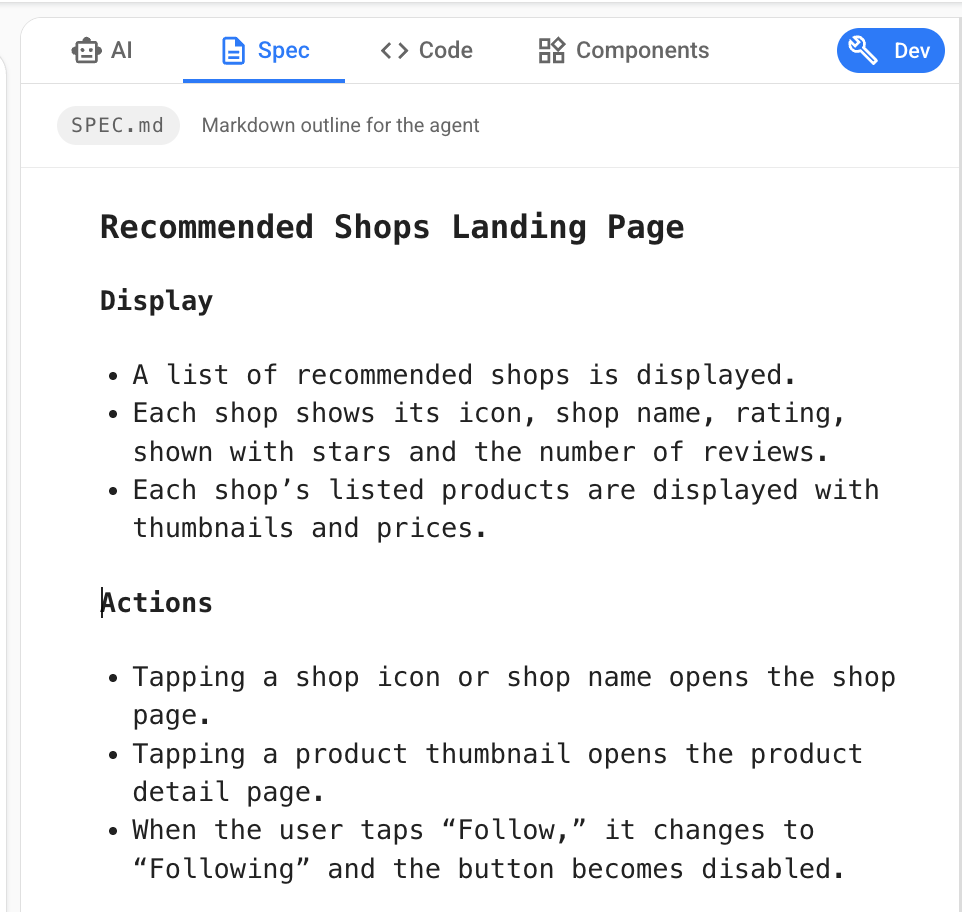
Then, in the chat with the AI, you ask "write tests based on @SPEC.md," and the agent generates the tests automatically from that context. The tests use a Jest-like API we built ourselves for the editor, and a built-in mock server intercepts fetch calls, so you can reproduce a dynamic page’s behavior inside the editor without hitting a real API.
// runs directly in the browser
test('the entry button calls the API', async () => {
  render(html);
  await userEvent.click(screen.getByText('Enter'));
  expect(mockEntry).toHaveBeenCalledWith({ campaign: 'X' });
});
When a test fails, the result is fed back to the AI, which then self-corrects. The whole flow, write the spec, let the AI generate the implementation and tests, then verify the behavior in the browser, happens inside the editor. That means you can build anything from static LPs to dynamic LPs with API integration, all under the same quality bar.
Native integration that bridges the app and web
LPs such as campaign pages are opened not only in a web browser. They are also opened in a WebView inside the Mercari marketplace app. In that case, a plain link would open an external browser from inside the app and fail to reach the app’s native screen.
Writing userAgent checks or native bridge calls in every LP to handle this isn’t realistic. So we handle the difference at the platform level, and the LP author just uses a dedicated Web Component.
<egp-link href="https://jp.mercari.com/search?keyword=camera">
  Search for cameras
</egp-link>
When the link is clicked, the runtime detects the environment automatically: inside the app, it routes to the native screen via the native bridge; on the web, it opens as a normal link.
Conclusion
AI tools have made it much easier to build UI, but turning that UI into a production LP still requires work specific to our internal environment: API integration, quality assurance, and bridging to native apps. By building these into the platform, EGP Code aims to cover the whole path from UI design to production operation within a single editing experience.
In practice, we’ve started to see new patterns like these:
- A PM and a frontend engineer taking an LP from defining the spec through to release
- A backend engineer building one solo, from the API to the LP
- A marketer finishing a static LP entirely on their own
Dynamic LPs that involve tests and API integration are still hard for non-engineers to finish on their own. Even so, the line between who can do what keeps moving, and we expect that before long, non-engineers will be able to build these dynamic LPs too.