



Hilt, Google’s recommended dependency injection library for Modern Android Apps, proposes built-in dependency scopes that are still based on the traditional Android components hierarchy. When a Composable screen with multiple ViewModels needs to share data through common dependencies, engineers have to rely on Singletons and “manually” fix data leakage to other screens. To improve on the recommended approach, we decided to circumvent this Hilt scoping limitation by creating a new custom scope called NavEntryScope, that enables scoping any dependencies to the current navigation entry. We released the custom scope and the tools to use it as a library.
You can find the library and a working sample on GitHub.
If you want to learn more about how and when to use this library, read along.
Many ViewModels on the same screen
Hi, I’m Luca, Android Engineer on the Logistics Client team. My team is responsible for the in-app user flow taking place after an item’s checkout, from the shipping options selection to the transaction completion through peer evaluation. It’s a single screen that we internally refer to as the “Transaction screen”.
All the shipping-related steps are part of this screen. We call an API to retrieve the current transaction status upon screen opening. Based on the API response, we decide what content to display. Each Transaction status has its own Composable function and independent ViewModel to handle the user interaction. Due to the nature of Transaction Screen, it would be hard to think of one single ViewModel to handle the entire interaction, but having several ViewModels on the same screen adhering with the standard Modern Android app’s architecture is notoriously difficult.
In our example, since the initial API response’s various payloads contain data that is required by all the ViewModels active in different parts of the screen, we want to make the same response available to all ViewModels without calling the API again in each of them. We ended up implementing a Repository that exposes a data flow: the first ViewModel requests the current transaction status, while the other ViewModels observe the response flow and get notified when a new response is available.
The key requirement for this approach to work is that all the ViewModels need to share the same Repository instance in order to observe the same data flow. We initially thought that using a Singleton scope could fit our requirements, but we eventually ran into a problem. Users can have multiple Transaction screens opened in the back stack: a Singleton Repository would leak data to all the open screens in the back stack.
Our initial solution was to make the Repository return a Transaction flow mapped on their ID.
@Singleton
class TransactionRepository @Inject constructor(
   private val transactionService: TransactionService,
) {
   private val flowMap =
       mutableMapOf<TransactionId, MutableSharedFlow<Result<Transaction>>>()

   fun getTransactionFlow(transactionId: TransactionId): Flow<Result<Transaction>> =
       getOrCreateFlow(transactionId)

   suspend fun fetchTransaction(transactionId: TransactionId): Result<Transaction> =
       transactionService.getTransaction(transactionId).toDomainEntity()
           .also { result -> getOrCreateFlow(transactionId).emit(result) }

   fun cleanupFlow(transactionId: TransactionId) {
       flowMap.remove(transactionId)
   }

   private fun getOrCreateFlow(transactionId: TransactionId)
       :MutableSharedFlow<Result<Transaction>> =
       flowMap.getOrPut(transactionId) { MutableSharedFlow(replay = 1) }
}
Each screen now gets its Transaction flow through their own ViewModels, but the workaround significantly increases maintenance costs. To use this Repository, we must pass a Transaction ID to access a data flow, and remember to call the cleanupFlow() method when the main ViewModel is destroyed. With the Singleton scope bringing so much complexity, we needed to reconsider our approach.
Why a Singleton Repository?
Hilt comes with a built-in hierarchy of Dagger components and automatically handles their lifecycle.
ViewModels are assigned to a ViewModelComponent and have visibility of dependencies in the ViewModelComponent itself and ancestor components (ActivityRetainedComponent and SingletonComponent). Once we decide what component we install our module in, we can set the respective Scope annotation to retain the dependency instance until the component is dismissed.
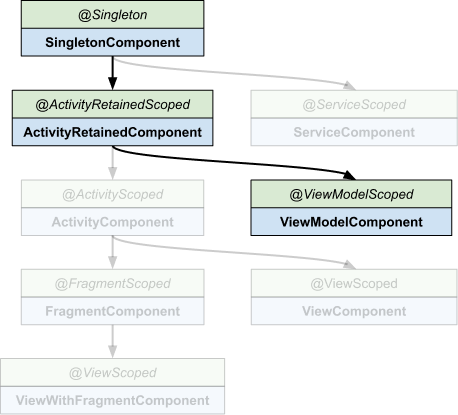
Original image from: https://dagger.dev/hilt/components
Let’s review how each scope affects our Repository:
-
@Singletonmakes the instance match the application’s lifecycle, which is too broad for us. The Repository will be shared by all screens of our app. That’s why we had to manually separate the data flows. -
@ActivityRetainedScopedis bound to the Activity lifecycle and survives configuration changes. Since we have a Single-Activity application, this scope almost overlaps with@Singleton. -
@ViewModelScopedmatches the ViewModel lifecycle. Each ViewModel gets its own instance, so there’s no sharing at all.
With the Singleton annotation, our Repository is correctly shared between ViewModels, but it’s also shared with screens belonging to different navigation back stacks. Avoiding the data leakage is our responsibility.
To share data flows from other repositories, we wanted to extract the ad-hoc workaround from the Repository and achieve appropriate scoping via dependency injection. We achieved so by creating a custom Hilt component and binding it to the navigation entry lifecycle.
Let’s check how to create the custom component first.
Create the Custom Hilt Component
Hilt supports the creation of custom components and allows us to add them to its hierarchy. The steps are well documented in the library docs. Here is how we need to tell Hilt about the custom NavEntryComponent.
/** The new scope annotation */
@Scope
@Retention(AnnotationRetention.BINARY)
annotation class NavEntryScoped

/** The component that will hold our scoped dependencies */
@NavEntryScoped
@DefineComponent(parent = ActivityRetainedComponent::class)
interface NavEntryComponent

/** Builder to create component instances */
@DefineComponent.Builder
interface NavEntryComponentBuilder {
    fun build(): NavEntryComponent
}

/** Entry point to access dependencies in this component */
@EntryPoint
@InstallIn(NavEntryComponent::class)
interface NavEntryEntryPoint {
  public fun sharedRepository(): SharedRepository
}
We’ve just created NavEntryComponent as a child of ActivityRetainedComponent. However, ViewModels can’t directly access dependencies in the new component because NavEntryComponent sits alongside ViewModelComponent as a sibling component, not as an ancestor.
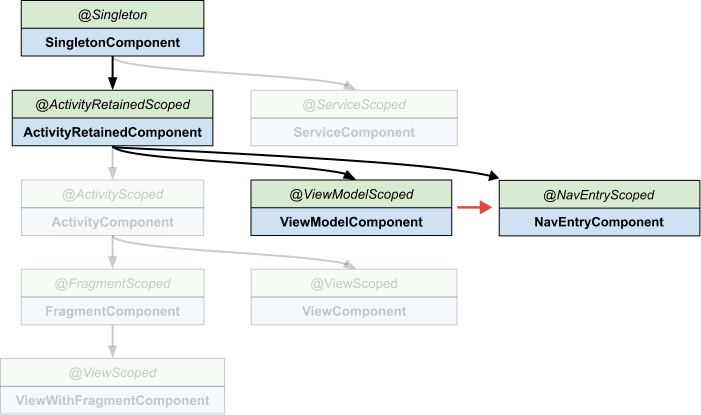
Original image from: https://dagger.dev/hilt/components
Hilt doesn’t allow us to make NavEntryComponent a parent of ViewModelComponent. To work around this limitation, we can build a custom bridge that gives ViewModels access to NavEntryScoped dependencies at runtime.
Access NavEntryComponent dependencies
Since our goal is to make NavEntryScope dependencies visible from a ViewModelComponent, we’ll have to provide the same dependency from ViewModelComponent too. Instead of instantiating the dependency directly, we’ll request the instance from NavEntryComponent through NavEntryEntryPoint.
Let’s see how we can create and pass the NavEntryComponent instance to a Module installed in ViewModelComponent.
NavEntryComponentStore is a simple map of screen ID and NavEntryComponent. We make it a Singleton whose instance is unique in the app and can be accessed by any Hilt component. Its responsibility is to store and return the component instance by screen ID.
@Singleton
class NavEntryComponentStore @Inject constructor() {
   private val components = mutableMapOf<String, NavEntryComponent>()

   fun storeComponent(navEntryScopeId: String, component: NavEntryComponent) {
       components[navEntryScopeId] = component
   }

   fun getComponent(navEntryScopeId: String): NavEntryComponent =
       components[navEntryScopeId] ?: error("Component not found")

   fun releaseComponent(navEntryScopeId: String) {
       components.remove(navEntryScopeId)
   }
}
We can now focus on managing the lifecycle of the NavEntryComponent instance for each screen. NavEntryComponentOwner creates both the component instance and a unique screen ID, then stores them in NavEntryComponentStore. When the screen is destroyed, the same tool will remove the component instance from NavEntryComponentStore.
The ViewModel lifecycle already matches our desired lifecycle. By making NavEntryComponentOwner a ViewModel, we can inject it via Hilt into our screen and leverage the onCleared() method for cleanup.
@HiltViewModel
class NavEntryComponentOwner @Inject constructor(
   componentBuilder: NavEntryComponentBuilder,
   private val componentStore: NavEntryComponentStore,
) : ViewModel() {

   private val navEntryScopeId = UUID.randomUUID().toString()

   init {
       // create and store component when initialized
       val component = componentBuilder.build()
       componentStore.storeComponent(navEntryScopeId, component)
   }

   fun getNavEntryScopeId(): String = navEntryScopeId

   override fun onCleared() {
       // cleanup when screen closes
       componentStore.releaseComponent(navEntryScopeId)
   }
}
We now need to pass the screen ID before injecting a ViewModel. This allows Hilt modules to retrieve the ID and obtain the current NavEntryComponent instance from NavEntryComponentStore. We do so by replacing the hiltViewModel method.
@Composable
inline fun <reified VM : ViewModel> navEntryScopedViewModel(
   vmStoreOwner: ViewModelStoreOwner = LocalViewModelStoreOwner.current,
): VM {
   val componentOwner = hiltViewModel<NavEntryComponentOwner>(vmStoreOwner)
   val navEntryScopeId = componentOwner.getNavEntryScopeId() // get screen ID
   val creationExtras = MutableCreationExtras(/* ... */).apply {
       set(DEFAULT_ARGS_KEY, Bundle(/* ... */).apply {
           // set screen ID into CreationExtras's bundle
           putString(NAV_ENTRY_SCOPE_ID, navEntryScopeId)
       })
   }

   return viewModel(
       modelClass = VM::class,
       viewModelStoreOwner = viewModelStoreOwner,
       factory = createHiltViewModelFactory(viewModelStoreOwner),
       extras = creationExtras, // provides screen ID via SavedStateHandle
   )
}
The final step is the actual “bridge” between ViewModelComponent and NavEntryComponent. We will create a new module to provide the NavEntryScoped dependencies into ViewModelComponent.
@Module
@InstallIn(ViewModelComponent::class)
object NavEntryModule {

   @Provides
   fun provideTransactionRepository(
       savedStateHandle: SavedStateHandle, // accessible in ViewModelComponent
       componentStore: NavEntryComponentStore, // Singleton
   ): TransactionRepository {
       // extract the screen ID
       val scopeId = savedStateHandle.get<String>(NAV_ENTRY_SCOPE_ID)
           ?: error("NAV_ENTRY_SCOPE_ID not found in SavedStateHandle")

       // get the stored component instance
       val component = componentStore.getComponent(scopeId)

       // obtain the entry point and return the scoped dependency
       return EntryPoints.get(component, NavEntryEntryPoint::class.java)
           .transactionRepository()
   }
}
What to change in your screen code
The most visible change is replacing the hiltViewModel() function call with navEntryScopedViewModel() for dependency injection. We have to replace it for each ViewModel that uses a NavEntryScoped dependency, directly or indirectly.
@Composable
fun UserProfile() {
   val viewModel: UserProfileViewModel = navEntryScopedViewModel()
   val state by viewModel.state.collectAsState()

   /* user profile row UI */
}
Besides that, there are two pieces of code that are not part of the library and must be updated for every new @NavEntryScoped-annotated dependency: NavEntryEntryPoint and NavEntryModule. For example, upon adding a scoped “ShippingRepository”, I need to make the following changes:
@NavEntryScoped
class ShippingRepository @Inject constructor(/* ... */)

@EntryPoint
@InstallIn(NavEntryComponent::class)
interface NavEntryEntryPoint {
  fun transactionRepository(): TransactionRepository
  fun shippingRepository(): ShippingRepository // ← newly added
}

@Module
@InstallIn(ViewModelComponent::class)
object NavEntryModule {
  @Provides
  fun provideTransactionRepository(
    savedStateHandle: SavedStateHandle,
    componentStore: NavEntryComponentStore
  ): TransactionRepository { /* bridge code */ }

  @Provides
  fun provideShippingRepository( // ← newly added
    savedStateHandle: SavedStateHandle,
    componentStore: NavEntryComponentStore
  ): ShippingRepository { /* same bridge code */ }
}
Writing this boilerplate for each scoped dependency is repetitive and error-prone. That’s why we implemented an annotation processor that automatically generates NavEntryEntryPoint and NavEntryModule, including all the scoped dependencies. All you have to do is annotate the scoped dependency with @NavEntryScoped.
Do you need NavEntryScope?
Our library makes it simple to introduce a new screen scope in your app with just a couple of code changes. However, be aware that adding a new Hilt component increases the complexity of your dependency graph in ways that may not be immediately apparent. You’ll need to make sure that your team understands how Dagger components and scopes work, and might find reduced dependency reusability across features. I suggest introducing NavEntryScope to your project if the benefits outweigh the complexity, and only scope dependencies that genuinely need to be shared within a screen.
Wrapping up
NavEntryScope bridges the gap between Hilt built-in scopes, giving us a clean way to share dependencies on the same screen. The benefit is a simpler repository deprived of the code to scope data flows and possible data leakages, and with seamless cleanup of the unused dependencies when the screen is dismissed.
While this solution continues to evolve based on feedback from teams across Mercari who’ve adopted it, I encourage you to try it and contribute.
You can find the library and source code on GitHub.
This solution was first presented (the slides are here) at droidcon Italy ‘25 (the presentation video will be made available soon).