



DBRE (DataBase Reliability Engineering)チームの taka-h です。
大規模なデータ更新や削除は、やりたいこと自体はSQLで表現できても、そのまま一度に実行すると運用上のリスクが高くなります。例えば大きなトランザクションが発生すると、レプリケーション遅延やDB負荷の増大、UNDOログの肥大化などにつながり、結果としてサービス影響を招く可能性があります。
そこで私たちは、UPDATE/DELETEのような「最終的にやりたい操作」をSQLに近い形で記述しつつ、実行時には安全な単位に分割して処理できる汎用ツールを実装しました。さらに、実行中に処理速度などの設定を変更できることや、監視結果に応じて自動で一時停止できることなど、実運用で必要になる制御も組み込んでいます。
本記事では、なぜこの問題が起きるのか、従来どのように回避してきたのか、そして今回のツールがどのように安全性と運用性を両立するのかを紹介します。最後に、ツールのREADMEも公開するので、同様の課題を持つ方が自分たちの環境に合わせて実装する際の叩き台として使えるはずです。
なおこのツールは、社内の次のようなデータベース運用の支援を前提とします。
- データをアーカイブ/削除する
- データをバックフィルする
- データを一括で更新する
大規模データの更新/削除操作における課題
小規模なデータベースであれば、目的のSQLをそのまま実行しても問題にならないことがあります。一方で、一定以上の規模のデータを扱う場合は、同じSQLでも“そのまま一括実行する”こと自体がリスクになります。
主な理由は、処理対象が多いと大きなトランザクションが発生しやすく、その副作用がDB全体に波及するためです。具体的には、変更の伝播(レプリケーションなど)に遅延が発生したり、DBが高負荷になったり、UNDOログが肥大化して回復や性能に影響が出たりします。
このような場合の従来の方針は、「対象を小分けにして処理する」でした。たとえば、対象の主キーをある程度の件数に分割し、短いトランザクションを繰り返すようなSQLを作成してもらったり、専用の使い切りのスクリプトを都度用意して対応していました。
BEGIN;
-- 対象の主キーを少量ずつ指定して処理する
DELETE FROM items WHERE id IN (...);
COMMIT;
SLEEP ...;
ただし、毎回使い切りのスクリプトを作ったり、対象主キーを取り出して分割したりするのは手間です。依頼者側に“安全な形のSQL”を組み立ててもらう必要が出るなど、運用コストが積み上がっていきます。
そこで、この問題に対して汎用的な解決策を提供するツールを実装しました。
解決策: 汎用化ツール
このツールでは、利用者は「最終的に達成したい条件」をSQLに近い形で記述します。一方で実行時には、その条件に合致する対象を主キー単位で取得し、バッチに分割して短いトランザクションを繰り返すことで、安全にUPDATE/DELETEを進められるようにしています。

また、実運用では「削除や更新の進捗」とは独立に、DB全体が高負荷になったり、想定外の問題が発生したりします。そのため、状況に応じて処理速度や挙動を調整できること、そして必要なら自動的に一時停止できることが重要です。
この要件に対して本ツールでは、処理間隔やバッチサイズなどの設定を実行中に変更できる機能を持たせています。これは、MySQLのオンラインスキーマ変更ツールである gh-ost が「実行中に操作を制御できる」点で運用上便利なのと同じ発想です。さらに、監視結果に応じて自動で処理を一時停止する仕組みも組み込んでいます。
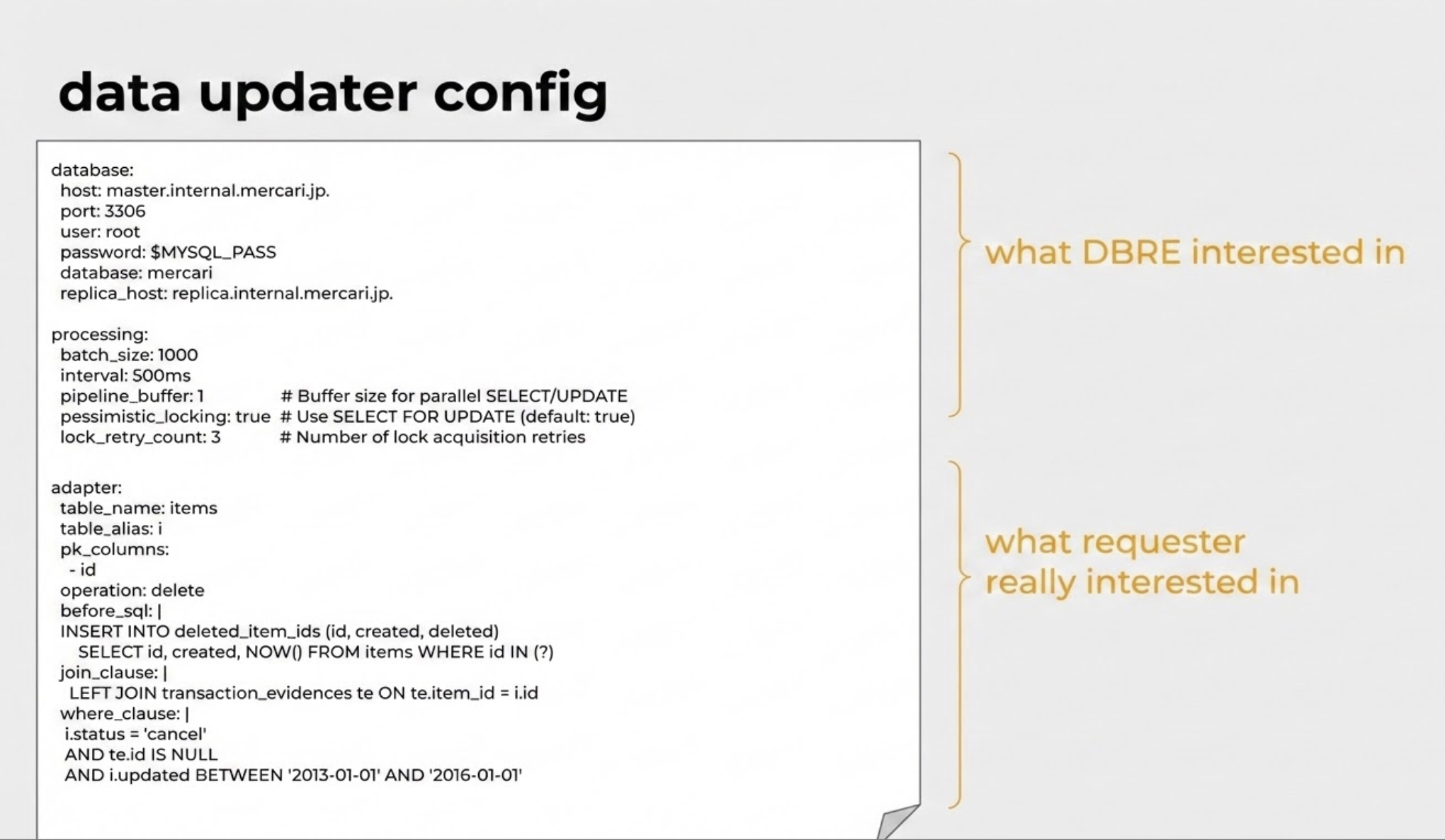
最終的なコンフィグ例は上図の通りです。実行したい条件(SQLに近い記述)と、どう安全に実行するか(運用上の関心事項)を分離して設定できます。また、processingに属する項目の多くは実行中に変更可能です。
このツールは主に生成AIを利用して実装し、動作確認のうえ社内で既に利用しています。コード自体のOSSとしての公開にはふみきれなかったのですが、次の章でこのツールのREADME.mdを公開します。これをご利用の環境に合わせた要件の追加、修正をしていただいた上で、生成AIを利用し同様のツールが利用できるようになることを期待しています。
もし試してみて有用だった点や改善アイデアがあれば、SNSなどで議論いただけると嬉しいです。また、「メルカリのDBREチームの公開したREADME.mdで作ってみた」ということで宣伝いただけるとありがたいです。
最後に、現在メルカリでは、この記事の発行者の所属する DBREチーム の EM(Engineering Manager) を募集しています。詳しくはこちらをご覧ください。
汎用データ更新ツールのREADME.md
# data-updater

A tool for batch data operations (UPDATE, DELETE, or NULL) on database records using primary keys with configurable conditions.

## Features

- Cursor-based batch processing with configurable batch size
- **Three operation types**: UPDATE, DELETE, and NULL (before_sql only)
- **Parallel execution**: SELECT and UPDATE operations run concurrently for better performance
- **Replica support**: Route SELECT queries to replica database to reduce primary load
- **JOIN support**: Complex queries with multiple tables to identify target records
- **Before SQL hooks**: Execute SQL before each batch (archiving, audit logging)
- **Custom ORDER BY**: Process records in custom order
- Interactive commands for runtime control (similar to gh-ost)
- **YAML-based configuration**: All settings in a single configuration file
- Real-time status monitoring with ETA
- Pause/resume functionality
- Dynamic configuration updates
- Socket-based remote control interface
- **Failed ID tracking**: Records failed updates and displays summary on exit
  - For batch-level failures: Records only first and last ID of the failed batch
  - For partial updates: Logs the discrepancy but doesn't track individual IDs
  - Writes detailed report to file if >100 failures
- **Automatic resume**: Saves progress to status file after each batch
  - Automatically resumes from last successful position on restart
  - No need to manually track progress or specify resume points
  - Status files are adapter/table specific for multiple concurrent jobs

## Install

```bash
go install github.com/xxx/cmd/data-updater
```

## Quick Start

1. Create a configuration file:

```yaml
# config.yaml
database:
  host: localhost
  port: 3306
  user: myuser
  password: mypassword
  database: mydatabase
  options:
    charset: utf8mb4
    parseTime: "true"

processing:
  batch_size: 1000
  interval: 1s

adapter:
  table_name: users
  pk_columns:
    - user_id
  update_sql: "status = 'processed', updated_at = NOW()"
  where_clause: "status = 'pending'"
```

2. Run the tool:

```bash
# Normal mode - executes updates
data-updater --config config.yaml

# Debug mode - SELECT only, no updates
data-updater --config config.yaml --debug

# Resume from specific ID
data-updater --config config.yaml --resume-from "12345"

# Show version
data-updater -v
```

## Operation Types

The tool supports three operation types:

### UPDATE (default)
Updates records matching the specified conditions.

```yaml
adapter:
  table_name: users
  pk_columns: ["user_id"]
  operation: update  # or omit (default)
  update_sql: "status = 'processed', updated_at = NOW()"
  where_clause: "status = 'pending'"
```

### DELETE
Deletes records matching the specified conditions.

**Important**: The DELETE operation permanently removes data. Always test with --debug mode first.

```yaml
adapter:
  table_name: old_logs
  pk_columns: ["id"]
  operation: delete
  where_clause: "created_at < '2023-01-01'"
```

### NULL
Executes only before_sql without UPDATE or DELETE. Useful for archiving, copying, or transforming data.

```yaml
adapter:
  table_name: items
  pk_columns: ["id"]
  operation: "null"
  before_sql: |
    INSERT INTO archived_items (id, name, created_at, archived_at)
    SELECT id, name, created_at, NOW() FROM items WHERE id IN (?)
  where_clause: "status = 'inactive'"
```

## Configuration

All settings are managed through a YAML configuration file:

### Database Configuration
```yaml
database:
  host: localhost         # Database host (default: localhost)
  port: 3306             # Database port (default: 3306)
  user: myuser           # Database user (required)
  password: mypassword   # Database password (required)
  database: mydatabase   # Database name (required)
  options:               # MySQL connection options (optional)
    charset: utf8mb4
    parseTime: "true"
    loc: UTC
    timeout: 30s
  # Replica configuration (optional)
  replica_host: replica-db.example.com  # SELECT queries go here
  replica_port: 3306                     # Defaults to primary port
  replica_user: replica_user             # Defaults to primary user
  replica_password: replica_password     # Defaults to primary password
```

When replica_host is configured:
- SELECT queries (fetching PKs, COUNT) are routed to replica
- UPDATE/DELETE operations always use primary
- SELECT FOR UPDATE (pessimistic locking) uses primary

### Processing Configuration
```yaml
processing:
  batch_size: 1000          # Number of rows per batch
  interval: 1s              # Time between batches (e.g., 1s, 500ms, 2m)
  debug_mode: false         # Log queries without executing updates
  pipeline_buffer: 1        # Buffer size for parallel SELECT/UPDATE
  pessimistic_locking: true  # Use SELECT FOR UPDATE (default: true)
  lock_retry_count: 3       # Number of lock acquisition retries
```

### Adapter Configuration
```yaml
adapter:
  table_name: users         # Target table (required)
  table_alias: u            # Alias for main table (required when using joins)
  pk_columns:               # Primary key column(s) (required)
    - user_id
  operation: update         # "update" (default), "delete", or "null"
  update_sql: "status = 'processed'"  # SET clause (required for update)
  before_sql: "..."         # SQL to execute before operation (required for null)
  where_clause: "status = 'pending'"  # Additional WHERE (optional)
  join_clause: "..."        # JOIN statements (optional)
  order_by: "created_at"    # Custom ORDER BY (optional, defaults to PK)
```

### Interactive Control
```yaml
interactive:
  enabled: true             # Enable socket-based control
  socket_path: "/tmp/data-updater.sock"  # Unix socket path
```

### Status File (Automatic Resume)
```yaml
status_file:
  enabled: true             # Enable automatic resume
  path: "/var/lib/status"   # Custom path (optional)
```

## Advanced Features

### JOIN Support

Use JOINs for complex queries that need to reference multiple tables:

```yaml
adapter:
  table_name: items
  table_alias: i
  pk_columns: ["id"]
  operation: delete
  join_clause: |
    LEFT JOIN transaction_evidences te ON te.item_id = i.id
  where_clause: |
    i.status = 'cancel'
    AND te.id IS NULL
```

**How it works:**
1. SELECT query uses JOINs + WHERE to fetch PKs
2. DELETE/UPDATE query only uses primary keys (no JOINs)

### Before SQL (Pre-operation Hook)

Execute SQL before each batch within the same transaction:

```yaml
adapter:
  table_name: items
  pk_columns: ["id"]
  operation: delete
  before_sql: |
    INSERT INTO deleted_item_ids (id, created, deleted)
    SELECT id, created, NOW() FROM items WHERE id IN (?)
  where_clause: "status = 'cancel'"
```

**Notes:**
- Use IN (?) placeholder - expanded to all PKs in the batch
- For composite keys: (col1, col2) IN (?)
- Executed atomically with the main operation
- If before_sql fails, entire transaction is rolled back

### Custom ORDER BY

Process records in a specific order:

```yaml
adapter:
  table_name: items
  table_alias: i
  pk_columns: ["id"]
  order_by: "i.created, i.id"
```

### Understanding update_sql

The update_sql parameter specifies the SET clause. **Do not include trailing semicolons.**

```yaml
# Simple status update
update_sql: "status = 'processed'"
# Results in: UPDATE users SET status = 'processed' WHERE user_id IN (...)

# Multiple columns
update_sql: "status = 'archived', archived_at = NOW()"

# Using CASE statements
update_sql: |
  status = CASE
    WHEN last_login < NOW() - INTERVAL 30 DAY THEN 'inactive'
    ELSE 'active'
  END
```

**Important**:
- Do NOT include UPDATE keyword, table name, or WHERE clause
- The tool automatically adds WHERE pk IN (...) for batch updates

### Using where_clause for Idempotent Operations

Make updates safe to run multiple times:

```yaml
adapter:
  update_sql: "status = 'processed', processed_at = NOW()"
  where_clause: "status = 'pending'"
# Results in: UPDATE users SET ... WHERE user_id IN (...) AND status = 'pending'
```

## Command Line Options

- --config, -c: Path to YAML configuration file (required for operation)
- --debug, -d: Enable debug mode (SELECT only, no updates)
- --resume-from: Manual resume from specific primary key(s)
- --total-rows: Skip initial COUNT query and use provided value (e.g., --total-rows 1000000). Also used as a stop condition based on rows_handled (rows selected), not rows_processed (rows affected by UPDATE)
- --pk-source: Read PKs from file/directory instead of table (local path or gs://bucket/path)
- --version, -v: Show version information
- --help, -h: Show help message

## Interactive Commands

Control the tool via Unix socket:

```bash
# Show status
echo "status" | nc -U /tmp/data-updater.sock

# Pause/resume processing
echo "pause" | nc -U /tmp/data-updater.sock
echo "resume" | nc -U /tmp/data-updater.sock

# Change batch size
echo "batch-size 5000" | nc -U /tmp/data-updater.sock

# Change interval
echo "interval 500ms" | nc -U /tmp/data-updater.sock

# Show help
echo "help" | nc -U /tmp/data-updater.sock

# Auto-interval: show status / enable / disable / set min
echo "auto-interval" | nc -U /tmp/data-updater.sock
echo "auto-interval on" | nc -U /tmp/data-updater.sock
echo "auto-interval off" | nc -U /tmp/data-updater.sock
echo "auto-interval min 200ms" | nc -U /tmp/data-updater.sock
```

## Debug Mode

Debug mode allows you to verify queries without executing updates:

```bash
data-updater --config config.yaml --debug
```

Example output:
```
INFO DEBUG: UPDATE query that would be executed query="UPDATE users SET status = 'processed' WHERE user_id IN (?,?,?)" args_count=3 primary_keys_count=3
```

## Resume Feature

### Automatic Resume (Default)
- Progress saved after each successful batch
- On restart, automatically resumes from last position
- Status files named: data-updater-{table}-{adapter}.status

### Manual Resume
```bash
# Single primary key
data-updater --config config.yaml --resume-from "12345"

# Composite primary key
data-updater --config config.yaml --resume-from "tenant1,12345"
```

### Resume Priority
1. Manual --resume-from (highest)
2. Status file (if exists)
3. Adapter's initial cursor (default)

### Skip COUNT Query
Use --total-rows to skip the initial COUNT query:
```bash
# Useful for large tables or retries where you know the total
data-updater --config config.yaml --total-rows 1000000
```

This is particularly useful when:
- Retrying after interruption (you already know the count)
- Large tables where COUNT(*) is expensive
- Faster startup when exact count is not critical

**Stop condition:** --total-rows stops the selector after handling (selecting) that many rows. The stop check uses rows_handled, not rows_processed. This means it works correctly even when UPDATE affects 0 rows (e.g., records already deleted by another process or filtered out by where_clause).

## PK Source (Read PKs from File)

Read primary keys from a file instead of the database table.

**Important:** --total-rows is required when using --pk-source for accurate progress/ETA calculation.

```bash
# Count lines first
wc -l failed-ids.txt
# 1500 failed-ids.txt

# From local file (--total-rows is required)
data-updater --config config.yaml --pk-source "./failed-ids.txt" --total-rows 1500

# From local directory (processes all files)
data-updater --config config.yaml --pk-source "./failed-ids/" --total-rows 5000

# From GCS file
data-updater --config config.yaml --pk-source "gs://bucket/failed-ids.txt" --total-rows 1500

# From GCS directory
data-updater --config config.yaml --pk-source "gs://bucket/failed-ids/" --total-rows 10000
```

Or configure in YAML:
```yaml
pk_source:
  path: "gs://my-bucket/failed-ids/"
  gcs_project: "my-gcp-project"  # Required for GCS paths
  skip_header: true              # Skip first line (for BQ exports with header)
  prefetch_buffer: 5             # Number of GCS files to prefetch ahead (default: 5)
```

**GCS Authentication:**

GCS access uses Application Default Credentials (ADC). Set up with:
```bash
gcloud auth application-default login
gcloud auth application-default set-quota-project <project>
```

**File format (CSV):**
```
# Comments starting with # are ignored
12345
12346
tenant1,12345
"value,with,comma",12346
```

**Skip header (for BigQuery exports):**

BigQuery exports include a header row with column names. Use skip_header: true to skip it:
```csv
id
12345
12346
```

**Features:**
- Files are read line by line (streaming) to minimize memory usage
- GCS files are prefetched in the background to eliminate download latency (configurable buffer, default 5)
- Directory support: processes all files in sorted order
- Resume support: tracks progress per file and line number
- Can be combined with where_clause to filter PKs from file

## Status Metrics

Status logs and the status interactive command report two counters:

- **rows_processed**: rows successfully affected by the UPDATE/DELETE operation (i.e., the database reported a row change)
- **rows_handled**: rows selected and sent through the pipeline, regardless of whether the UPDATE/DELETE actually modified the row. This counter is used for progress percentage and ETA calculations

When rows_handled is higher than rows_processed, it typically means some rows were already in the desired state (e.g., already deleted or already updated by a previous run).

## Hibernate (Health-Check Based Pause)

The hibernate feature allows the processor to periodically run an external health-check script. If the script returns a non-zero exit code (indicating a problem), the processor pauses for a configurable period, then automatically resumes.

### Configuration

```yaml
processing:
  hibernate_script_path: "/path/to/check.sh"
  hibernate_pause_period: 30s
  hibernate_check_interval: 15s
```

- hibernate_script_path: Path to an executable script. The script is run at the configured check interval (default 15s). Exit code 0 means healthy; any non-zero exit code triggers hibernation.
- hibernate_pause_period: How long the processor pauses when the script signals a problem. Required when hibernate_script_path is set.
- hibernate_check_interval: How often the health-check script is executed. Defaults to 15s.

### Behavior

1. The health-check script is executed at the configured interval (default 15s) while the processor is running
2. If the script exits with code 0, processing continues normally
3. If the script exits with a non-zero code, the processor pauses for hibernate_pause_period, then automatically resumes
4. The hibernation_count metric tracks the total number of times hibernation was triggered (visible in status command output and periodic logs)

### Use Cases

- Pause when database replication lag exceeds a threshold
- Pause when disk space is low
- Pause during maintenance windows
- Any custom operator-defined health check

## Hourly Summary Log

For long-running jobs, you can enable an hourly summary log that writes JSON entries to a dedicated file. A final summary is also written on shutdown, so short-lived runs still produce a report.

```yaml
processing:
  hourly_log_path: "/var/log/data-updater/hourly.log"
```

Each JSON line includes:
- rows_processed_total / rows_processed_delta — records processed in total and during the period
- rows_failed_total / rows_failed_delta
- hibernation_count_total / hibernation_count_delta
- total_rows, rows_remaining, progress — overall progress
- interactive_commands — commands issued via socket during the period (with timestamps)
- summary_type — "hourly" or "final"

If hourly_log_path is not set, the reporter is not started.

## Auto-Interval Adjustment

Automatically adjusts the processing interval based on the hibernation ratio observed each hour. When many hibernate checks fail (high ratio), the interval increases (slows down). When the ratio is low, the interval decreases (speeds up).

```yaml
processing:
  auto_interval_enabled: true
  auto_interval_high_ratio: 0.3    # ratio >= this → slow down (default: 0.3)
  auto_interval_low_ratio: 0       # ratio <= this → speed up (default: 0)
  auto_interval_increase_factor: 1.25  # multiply interval by this to slow down (default: 1.25)
  auto_interval_decrease_factor: 0.8   # multiply interval by this to speed up (default: 0.8)
  auto_interval_min: 200ms         # floor for interval (default: initial interval)
  auto_interval_max: 30s           # ceiling for interval (default: 10x min)
```

Auto-interval can be toggled at runtime via socket commands (auto-interval on/off). See [Interactive Commands](#interactive-commands).

## Pessimistic Locking

Prevent concurrent modifications with pessimistic locking:

```yaml
processing:
  pessimistic_locking: true  # default
  lock_retry_count: 3
```

Transaction pattern:
```sql
BEGIN;
SELECT ... FOR UPDATE WHERE ID IN (...);
UPDATE ... WHERE ID IN (...);
COMMIT;
```

- MySQL 8.0+: Uses NOWAIT clause
- Sets innodb_lock_wait_timeout=1 to minimize lock wait

## Environment Variables

Use environment variables for sensitive data:

```yaml
database:
  host: "${DB_HOST}"
  user: "${DB_USER}"
  password: "${DB_PASSWORD}"
  database: "${DB_NAME}"
```

## Examples

See the examples/ directory for complete configuration files:

- minimal-config.yaml: Bare minimum configuration
- full-config.yaml: All available options with comments
- production-config.yaml: Production-ready configuration
- complex-update.yaml: Complex SQL with CASE statements
- multiline-example.yaml: Multi-line SQL using YAML block scalars
- update-sql-examples.yaml: Various update_sql patterns

## Production Tips

1. **Use environment variables** for sensitive data
2. **Enable status files** for automatic resume
3. **Set appropriate intervals** to avoid overwhelming the database
4. **Use pessimistic locking** for critical data consistency
5. **Configure replica** to offload SELECT queries from primary
6. **Test with debug mode** before running DELETE operations
7. **Use before_sql** to archive data before deletion

## Troubleshooting

### Common Issues

1. **Permission denied on socket**: Check socket path permissions
2. **Resume not working**: Verify status file path and permissions
3. **Slow processing**: Increase batch size or decrease interval
4. **Lock timeouts**: Enable pessimistic locking or increase retry count

## License

See LICENSE file in the repository root.